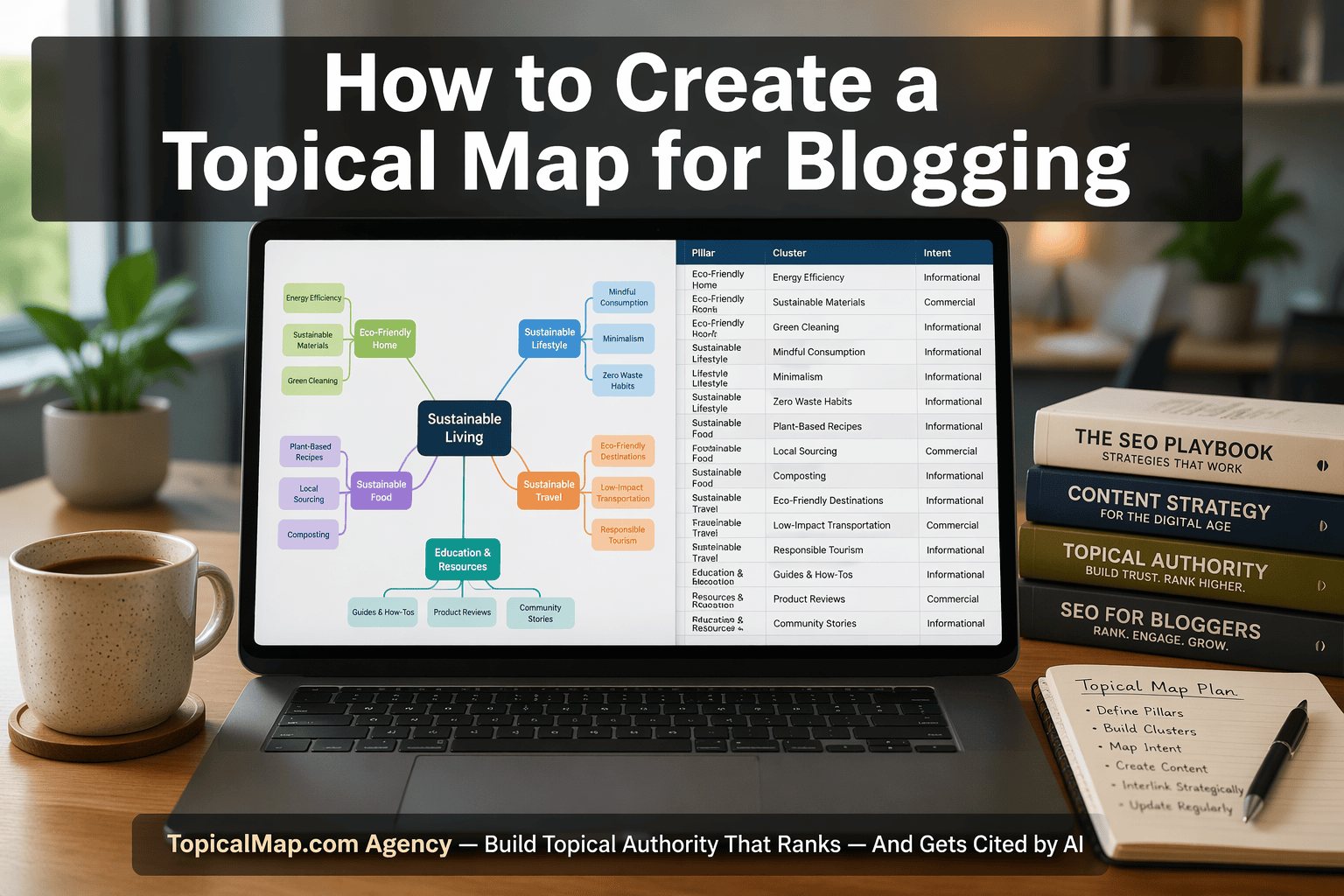
Creating a topical map for blogging gives a site a clear content structure instead of a pile of disconnected posts. That matters when a blog has to cover a niche without creating overlap, thin pages, or keyword cannibalization. A topical map is a structured blueprint that groups pillar topics, cluster posts, and supporting questions into one planned hierarchy, so the publishing plan has a defined job from the start.
For SaaS teams, e-commerce brands, agency strategists, and niche site owners, the hardest part is not finding ideas but sorting them into a layout that search engines and readers can follow. This article covers how to define a niche, validate subtopics, group pillars and clusters, map internal links, and build a spreadsheet template you can actually use. It also shows how to spot gaps, assign intent, and create a cleaner launch plan before drafts go live.
That approach helps SEO managers, content leads, and independent bloggers spend less time on scattered research and more time on pages that support topical authority. A short example is a smart home site that keeps Smart Thermostats as the pillar, Google Nest as the cluster, and How to Reset as the support page. The result is a plan that is easier to brief, easier to publish, and much easier to defend when rankings and AI citations start to matter.
Topical Map Key Takeaways
- A topical map turns blog planning into a structured hierarchy.
- Start with a niche broad enough for long-term content growth.
- Validate subtopics with search data, SERPs, and audience language.
- Group topics by intent, not just similar keywords.
- Use pillars and clusters to define page roles and depth.
- Map internal links so authority flows through related pages.
- Review overlap, gaps, and intent before publishing anything.
Why Does Your Blog Need A Topical Map?
A topical map is a structured blueprint for your blog. It organizes main topics, subtopics, and specific questions into a semantic network instead of treating each post like a one-off idea or a random keyword target. That shift makes topical mapping a planning system, not just a brainstorming exercise. If you want a full walkthrough, learn how to create a topical map from the ground up.
The SEO benefits are straightforward. When related pages are grouped with clear intent, search engines can better understand what your site covers. That supports topical authority and improves your chances of ranking for related queries within a niche. It also makes content mapping more useful, because each article has a defined role in the site structure.
Readers feel that structure too. A clear hierarchy lets visitors move from a broad overview to narrower articles without getting lost. The blog becomes easier to navigate and more useful in practice. For bloggers, consultants, and content teams, that usually means fewer dead ends and a smoother path from curiosity to action.
The biggest risk shows up when publishing starts before planning. If you write first and map later, two or more pages can chase the same intent and split relevance between them. That is content cannibalization, and it weakens both pages because neither one owns a clean job.
A good topical map reduces that risk by acting as a quality check before anything goes live. It helps you spot missing subtopics, overlaps, and coverage gaps early, so the blog stays comprehensive without repeating itself. It also gives you clearer internal linking, a more coherent publishing roadmap, and a reusable content plan that editors and writers can follow.
That is why topical authority maps are so useful. They turn research into an export-ready plan that can guide briefs, page hierarchy, and topic-cluster execution with far less guesswork.
- Blog structure: Each page fits a distinct role.
- Reader flow: Broad and narrow content connect cleanly.
- SEO coverage: Related queries reinforce one another.
- Quality control: Gaps and overlaps surface before publication.
How Do You Define Your Niche And Main Topic?
The best niche sits in the middle. It is specific enough to build topical authority, but broad enough to keep growing for years. “Dogs” is too wide. “Dog food for golden retrievers” is usually too tight. “Dog food” is the kind of focused middle ground that leaves room for a real content strategy.
A strong way to narrow the niche is to combine a broad category with a clear audience, use case, or angle. That turns a generic market into something with a point of view. Personal finance can become financial independence for remote freelancers. Smart home can become smart security systems for apartment renters.
Before you commit, run a simple check:
- Audience fit: You can name the exact reader or buyer.
- Content depth: The topic can support a pillar topic and several cluster pages.
- Search demand: Keyword research and Semrush keyword research show enough related queries.
- Competitive proof: Forums, podcasts, YouTube, communities, and competitor pages surface real questions and product angles.
- Scale check: The topic can expand into subdirectories and supporting articles without collapsing into one thin page.
The main topic should be the broad hub that holds everything together. Smart thermostats, security cameras, and similar categories work because they have clear Search Engine Optimization (SEO) demand and enough subtopics for long-term growth. If a niche only fills one article, it is too small. If it can support dozens of related pages, you have a solid base for topical authority.
Competitor coverage matters too. Strong pages usually show both informational and commercial angles, not the same idea repeated in different wording. That is the difference between a single article and a full topical map. It also gives your content strategy room to grow without wasting effort on dead ends.
How Do You Discover And Validate Subtopics?
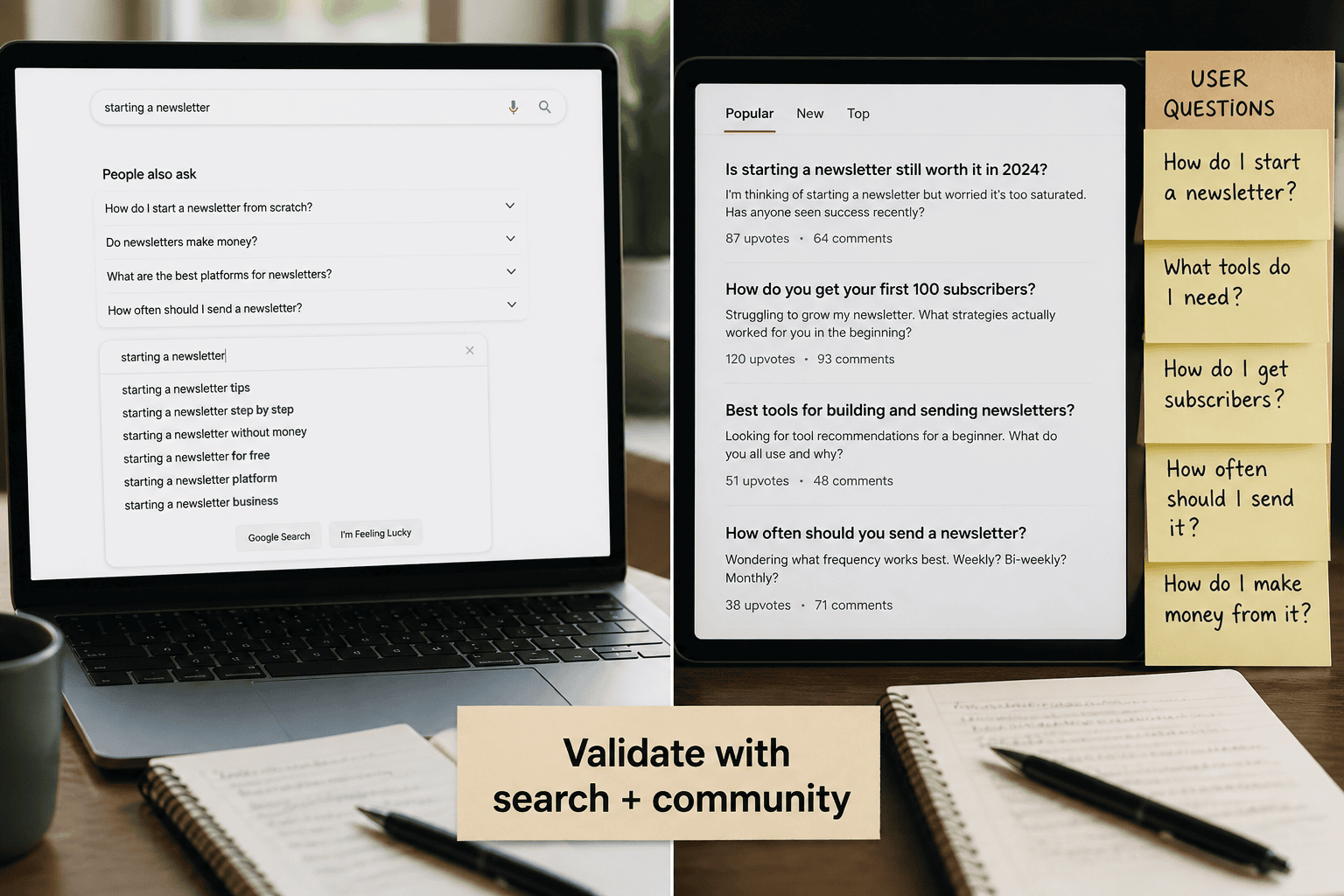
Start wide, then narrow fast. The strongest subtopics usually come from more than one source, because a good topical map starts with a larger raw idea pool and a tighter validation pass. Mapping search intent for blog posts helps you sort the early noise before it becomes a publishing plan.
A practical discovery pass pulls from several places at once:
- Google surfaces: People Also Ask, Related Searches, autocomplete, and Google Trends
- Community spaces: Reddit, Quora, and niche Facebook groups
- Brainstorming inputs: customer questions, sales calls, support tickets, and AI brainstorming
- Search exports: early keyword research exports from your usual tools
That mix gives you a broader semantic network than a single keyword list. It also helps you hear the language real readers use, which matters when your content needs to match search intent instead of guessing at it.
Once the raw list is in place, clean it hard. Remove duplicates, merge overlapping ideas, and cut fragments that do not reflect a real search need. This keeps your topical map from filling up with near-identical pages that blur the message and create cannibalization later.
Intent is the next filter. If two queries solve the same job, they usually belong in one article. If the intent changes, split them into separate subtopics or separate articles. That is where smart clustering beats simple volume chasing, because fit matters more than raw counts.
Validation should be blunt. Use Ahrefs keyword research and Semrush keyword research to check demand, then inspect page one to see whether the results match the format you plan to publish. If the SERP shows mixed page types, weak relevance, or competing site types that do not line up with your angle, refine the topic or break it apart.
A clean workflow looks like this:
- Brainstorm broadly across tools, communities, and AI brainstorming.
- Cluster the ideas by search intent.
- Validate demand in Ahrefs or Semrush.
- Check the SERP shape by hand.
- Keep only the subtopics that show clear intent, reasonable demand, and a strong fit with the pillar page.
The subtopics you keep should feel defensible on paper and believable in the SERP. That is the point where research turns into a topical map you can actually publish with confidence.
How Do You Group Topics Into Pillars And Clusters?
A clean topical map starts with one broad pillar topic and then branches into tightly related topic clusters that support it. The pillar is the main category. The clusters are the subtopics, questions, and long-tail ideas that give that category real depth. A workflow for grouping topics into clusters helps you sort those groups before they become pages.
A simple topical map template makes the structure easier to scan:
Layer | What it does | Example |
|---|---|---|
Pillar | Sets the broad theme | Smart Thermostats |
Cluster | Covers a focused angle | Google Nest, How to Reset, Installation Tips |
Supporting page | Answers one narrow intent | Troubleshooting a specific error |
Most blogs work best with a tight pillar set. For many sites, starting with three to five core pillars can keep the map focused and easier to manage (source). Broader niches can support more foundational categories when each one has clear search demand, audience fit, and enough depth to stand on its own (source).
That's where content clusters and cluster content matter. Group keywords by search intent and close topical similarity, not by wording alone. If several queries point to the same subtheme, keep them together, choose the clearest cluster name, and use internal linking to connect the related pages without creating cannibalization.
Use this depth rule to keep the site usable:
- Stay within 3 levels below the main topic whenever possible.
- Keep click depth at 4 or less, including the home page or hub page.
- Add more nesting only when the niche truly needs a deeper structure.
A coffee site shows the pattern clearly. Coffee Brewing Methods, Coffee Beans, and Espresso Machines can work as pillars. Under each one, you can place comparison posts, troubleshooting guides, and how-to articles as supporting content.
When you choose which groups become pillar content, weigh three factors:
- Audience fit: Does the topic match what your best readers want?
- Search demand: Is there enough interest to justify a hub?
- Monetization potential: Can the cluster support leads, products, or affiliate revenue?
A smart home site makes the progression even easier to picture. Smart Thermostats can serve as the pillar topic. Google Nest can sit beneath it as a cluster. Google Nest Learning Thermostat can narrow the focus further. How to Reset becomes even more specific cluster content. That ladder keeps your content clusters logical, usable, and easier to expand without overlap.
Build the map from the strongest groups first, then promote only the best ones into pillar status. That gives you a structure you can publish, link, and scale with confidence.
How Do You Map Internal Links And Site Hierarchy?
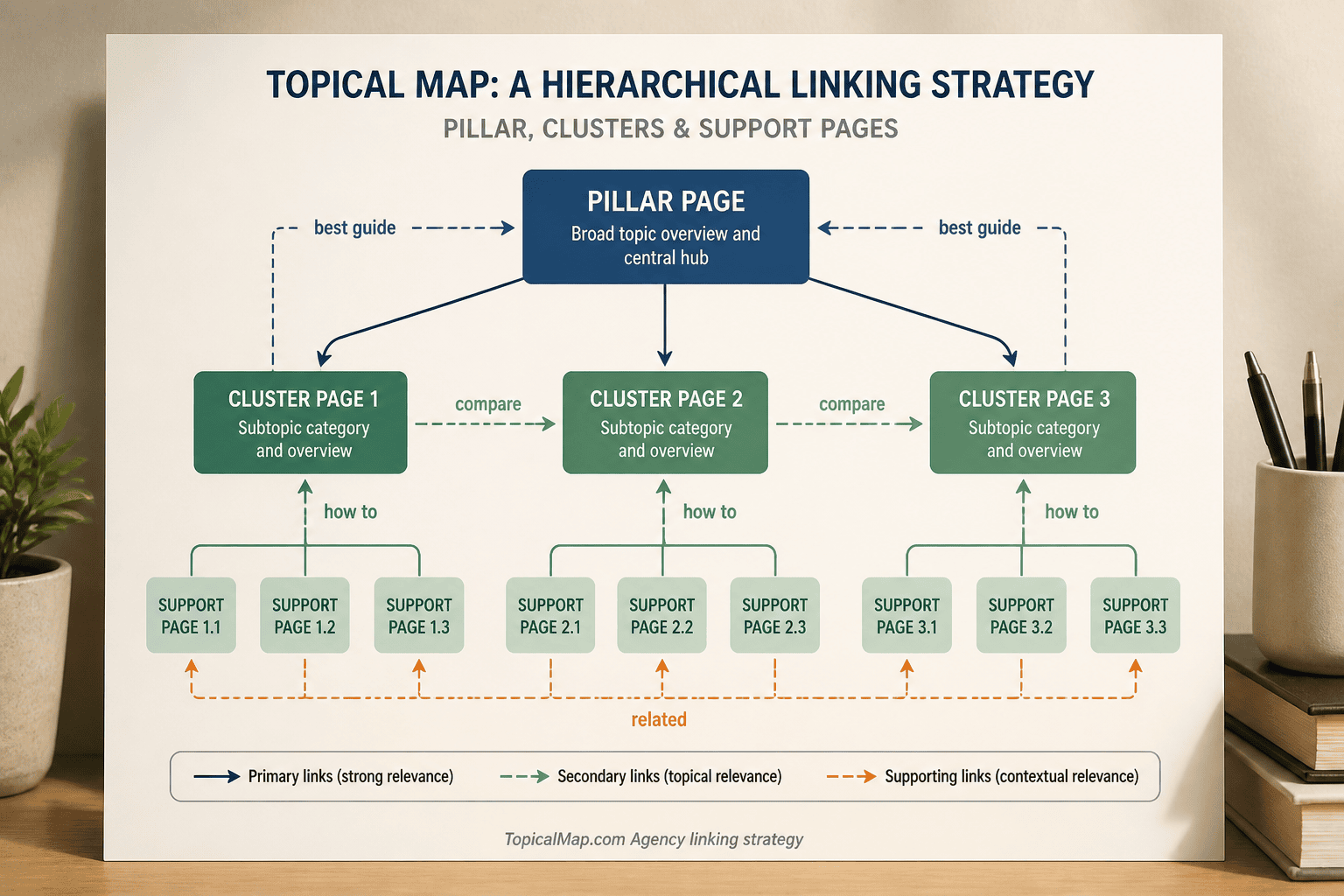
A strong topical map only works when your content structure and internal linking plan match the search intent behind each page. Start broad, then move narrower. Put pillar content at the top, place each cluster page one level below it, and keep supporting content inside the same branch so users and crawlers can follow the path without guessing.
The clearest way to make that structure pay off is to build explicit link paths:
- Downward links: Have the pillar page point to the most important cluster articles with anchor text that matches each page’s purpose.
- Upward links: Have every supporting post link back to the pillar with descriptive text, not vague phrases like “read more” or “related post.”
- Horizontal links: Add links between sibling posts only when the connection is real, such as two variants in the same family or two articles that answer adjacent questions.
- Structural signals: Use breadcrumbs and clean URL paths so the site’s architecture helps bots move from the home page to core topics and then into deeper subtopics.
That setup does more than tidy navigation. It helps link equity circulate across the site instead of sitting on isolated pages. It also improves crawlability, because search engines can find important pages faster and understand how each URL relates to the rest of the topic set.
The other big win is avoiding keyword cannibalization. If two queries need different answers, map them to different URLs and connect them through the topical map instead of forcing one page to chase both. That choice keeps the intent clear and usually leads to stronger SEO benefits because each page has a defined job.
Internal linking is the execution layer of the map, not an afterthought. When your pillar content, supporting content, and link paths all point in the same direction, topical relevance becomes easier to prove and easier to scale.
How Do You Build Your Topical Map Template?
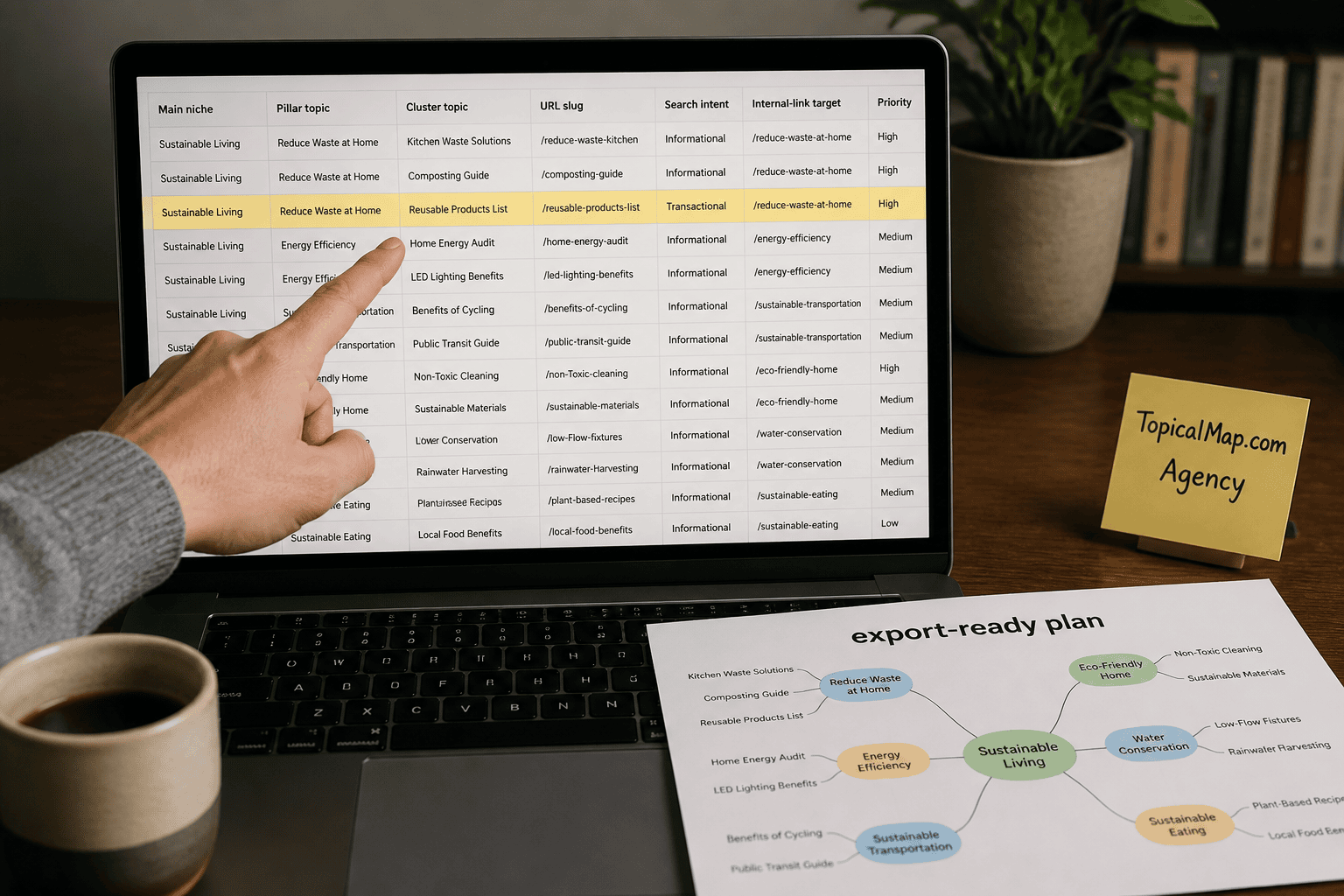
Start with a spreadsheet that acts as your master topical map template. It keeps topical mapping, content mapping, and planning in one place, so the sheet works as both a working document and an export-ready content plan. A solid topical map creation process usually starts with columns for main niche, pillar topic, cluster topic, supporting keyword variations, URL slug, search intent, internal-link target, and publishing priority.
Build the hierarchy from the top down. Define the niche first. Then map the pillar pages. After that, place cluster articles under each pillar so the structure is easy to scan and the relationship between broad themes and supporting subtopics stays clear.
A simple template can look like this:
Field | Purpose |
|---|---|
Main niche | Sets the site boundary |
Pillar topic | Marks the core hub page |
Cluster topic | Defines the supporting article |
Supporting keywords | Captures close variations |
URL slug | Helps with publishing setup |
Search intent | Tags the user’s goal |
Internal-link target | Shows the parent or related page |
Publishing priority | Orders the work |
Priority matters because not every idea deserves equal attention. Ahrefs-style bands help here, with band 5 as the highest priority. That gives you a clean way to sequence pages by business value, topical relevance, and content gaps instead of chasing every related query that shows up in keyword tools.
Make cluster assignment and intent labels explicit before you lock the plan. Tag each topic as informational, commercial, or navigational. Then mark whether it needs a new page or belongs on an existing URL. That filter keeps off-strategy ideas out of the build and protects your content strategy from duplication.
Internal-link mapping should live in the same sheet. Each cluster needs a defined parent page, and supporting pages should have clear lateral links where the relationship is natural. That is where gaps show up fast, because missing coverage becomes obvious in the structure.
Validation is the step that keeps the launch clean. Compare proposed clusters against Google People Also Ask, related searches, Reddit threads, YouTube comments, keyword tools, and competitor sitemaps. This check helps you remove overlap, confirm that each subtopic stands on its own, and avoid ideas that do not fit your brand or business model.
When you want stakeholders to visualize topical map structure quickly, mirror the spreadsheet in a mind map or board tool such as Miro, XMind, MindMeister, or a Canva topical map. The spreadsheet stays the operating source of truth, while the visual version helps teams grasp the shape of the site at a glance. If the workflow uses AI brainstorming, note that a senior strategist reviewed the output and that results vary by site, industry, and implementation.
What Mistakes Should You Review Before Publishing?
Publishing mistakes usually start when the page is built for the keyword instead of the job it needs to do. The fastest fix is to review search intent first.
A solid pre-publish pass should cover these checks:
- Intent match: Keep informational queries educational. Split buyer-intent topics into separate posts when the searcher is comparing options, pricing, or vendors.
- Keyword overlap: Compare the draft with live URLs in the same topical cluster. If two pages answer the same question or target the same intent, merge, redirect, or re-scope one so they stop competing.
- Topic depth: Make sure the page finishes the topic without drifting into unrelated material. Cover the main questions, common variations, and expected angles, but keep product-led subtopics in their own articles.
- Internal links: Add links from the new page to older relevant pages, and add links from existing pages back to the new one. That keeps the page from becoming orphaned and makes site structure easier for search engines to read.
- Freshness: Recheck current keyword research, performance data, and topical-map gaps. Stale pages can weaken authority signals and drift into quick-win content that gets unstable when rankings shift.
A simple pre-publish checklist keeps the review tight:
- Confirm the page matches search intent.
- Check for overlap with live URLs.
- Verify full-topic coverage without duplication.
- Confirm internal links in both directions.
If any answer feels fuzzy, revise the draft before it goes live. That protects the topical map and saves cleanup work later.
Topical Map for Blogging FAQs
These FAQs cover the questions you're likely asking as you plan a topical map for blogging, from how to visualize topical map ideas to when a Canva topical map makes sense for a first draft. They're here to clarify the basics before the detailed answers below.
1. How Often Should You Update Your Topical Map?
Review your topical map monthly or quarterly so it stays aligned with SEO priorities and your publishing pace. Update it sooner when SERP changes reveal new subtopics, shifting intent, or competitor pages moving ahead of yours. Fresh audience signals from keyword research, comments, social listening, and repeat questions should also trigger an expansion, especially when rankings, traffic, or clicks start sliding and a cluster needs stronger internal links, fresher content, or one more supporting page.
2. How Is A Topical Map Different From A Content Calendar?
A topical map is the strategy layer for planning SEO coverage. It sets your main niche, pillar topics, and cluster articles so your SEO coverage is complete and logically connected. A content calendar is the execution layer. It turns that plan into dates, stages, and publishing order, and tools like Google Sheets or Notion can make the handoff easier without replacing the strategy. The map should stay fairly stable, while the calendar shifts with deadlines, capacity, seasonality, and priority bands. Used together, the map prevents random publishing and cannibalization, and the calendar keeps the work moving in a realistic sequence.
3. How Deep Should Each Topic Cluster Be?
A strong cluster stays narrow enough to feel like one subject area. For most blogs, keep the map narrow enough that each pillar has clear supporting clusters and each cluster stays close to the main topic. Add more categories or more depth only when the niche, demand, and site structure justify it (source, source). Stop adding supporting posts when new ideas drift off-topic, start overlapping an existing page, or stop strengthening the pillar's coverage, since topical maps are meant to build topical authority and organize a semantic content network before you publish.
4. Can One Topical Map Cover Multiple Blog Topics?
One topical map can cover multiple blog topics when they belong to the same broad niche and can be grouped around one core theme with closely related subtopics. If the topics serve different user intent, they usually need separate posts or separate maps, because mixed targeting can trigger keyword cannibalization and weaken topical authority. For an existing site, build the new topical map first, then fit current articles into it so you can spot overlaps, gaps, and pages competing for the same query before you publish more. Avoid chasing unrelated quick win keywords, since they usually dilute focus and can make rankings more volatile during algorithm updates.
5. Which Tools Help Build A Blog Topical Map?
Start with Google SERP features like People Also Ask, Related Searches, and autocomplete, then use browser helpers such as SEO Minion or Similarweb-style tools to pull URLs, page titles, and question patterns into a raw topic list. For subtopic keyword research, Ahrefs, Semrush, AnswerThePublic, Reddit, and Quora help you validate demand and capture the language readers actually use, while Keywords Everywhere and MozBar give you quick reality checks on volume and authority before you cluster. After that, clean and dedupe the list in Google Sheets, sketch the structure in Miro, XMind, MindMeister, Canva, or myMind, and use AI-assisted tools like SurferSEO, TopicalMap.AI, or ChatGPT only after manual SERP review so the final map reflects search intent, not just grouped keywords.