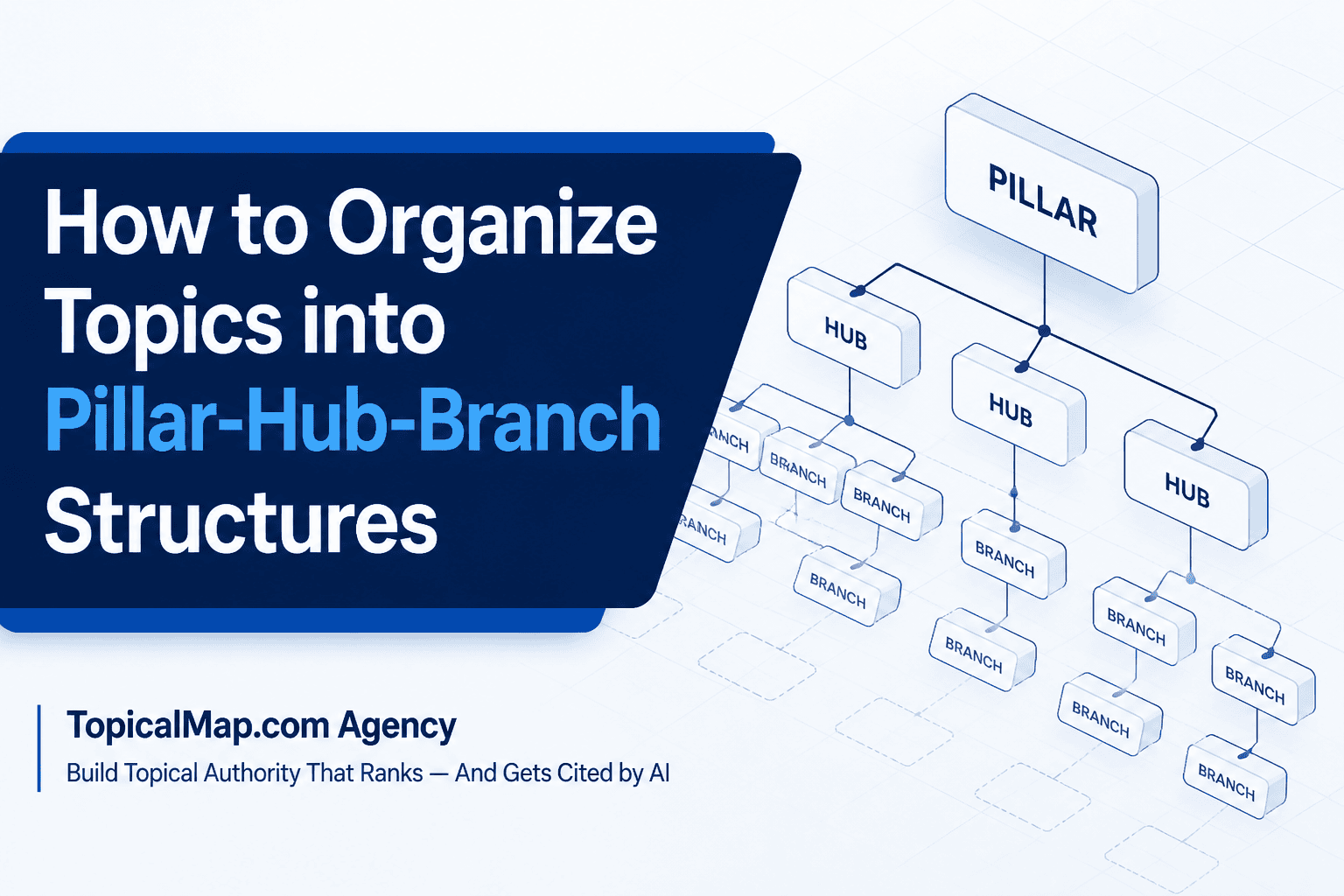
How to organize topics into pillar-hub-branch structures is a practical SEO planning guide for turning broad themes into a clear site architecture. Content teams often know the subject they want to own, yet the page plan still turns into overlapping briefs, thin clusters, and internal-link confusion. It's a hierarchy where a pillar page anchors a broad theme, hubs split it into subtopics, and branches answer specific intents. The payoff is a content structure you can map, brief, and publish without guesswork.
The sections ahead cover how to choose pillars, separate hubs from branches, and decide when a topic has enough depth to justify a cluster. They also show how to build export-ready spreadsheets, naming rules, sitemap files, and internal-link plans that developers and editors can actually use. Expect a working QA checklist, URL conventions, and handoff notes that keep cannibalization and duplicate paths out of the launch process.
For heads of content, content strategists, SEO managers, and agency teams, the value is in a plan that saves research time while protecting topical clarity. A SaaS team, for example, can see why a revenue attribution branch belongs under a reporting hub instead of competing with the pillar itself. That kind of structure is what keeps the site organized, the briefs usable, and the next round of content easier to ship.
Pillar-Hub-Branch Structures Key Takeaways
- Choose pillars from business intent, audience need, and offer fit.
- Use hubs to split a broad pillar into distinct subtopics.
- Build branches for one clear intent per page.
- Keep only topics with enough depth and scale.
- Export cluster plans in spreadsheets, mind maps, and CSVs.
- Use strict URL rules to protect crawl paths and clarity.
- Measure traffic, indexation, internal links, and cannibalization regularly.
How Do You Identify Pillars Hubs And Branches And When Should You Use Them?

Start with business intent, not a keyword dump. The best candidates sit where niche, audience, and offer overlap. Those topics are the ones you want the market to connect with your brand.
A practical starting point is three to five content pillars. For each one, document the audience problem and the commercial goal before you sketch pages. The research flow in topical map topic research and the broader process of assembling a topical map point to the same rule. A pillar should be the core interest you want known for, not just a high-volume query.
Breadth is the next test. Healthy pillar pages can branch into multiple hubs and support a larger set of related pieces over time (source). If you cannot picture at least a dozen useful pages, the topic is probably too narrow. Broaden it before you build pillar content around it.
The pillar-hub-branch model works best when the structure can carry real depth. Here is the quick check:
- Core fit: The topic sits at the center of your brand promise
- Depth: The topic can split into three or more hubs
- Scale: The plan supports enough branch pages to justify the pillar
- Clarity: The structure should reduce internal overlap and cannibalization
Hubs and branches do different work. A content hub is the mid-level grouping that splits a broad pillar into distinct sub-interests. Branch content is the focused page that answers one need with one clear intent. Search Engine Results Page, or SERP, analysis helps you set those boundaries. Click-depth planning from topical map principles keeps main topics at depth one. Navigation matters too, because the content hub should feel natural in the site structure.
Branch pages should earn their place by intent, not habit. Common branch formats include how-to pages, comparisons, and product pages. Each one should link back to its hub and pillar. Search intent, commercial priority, and keyword opportunity from your SERP audit should decide what gets built first.
Use the model when demand is visible across subtopics, when you can maintain about 12 or more pages per pillar, or when competing pages already confuse search engines. Otherwise, build one strong silo top-down before you scale. When the answer is yes, formalize the pillar-hub-branch plan and hand writers and engineers a mind map plus CSV mapping so the structure survives beyond the strategy meeting.
How Do You Build Export Ready Mapping Assets For Clusters?
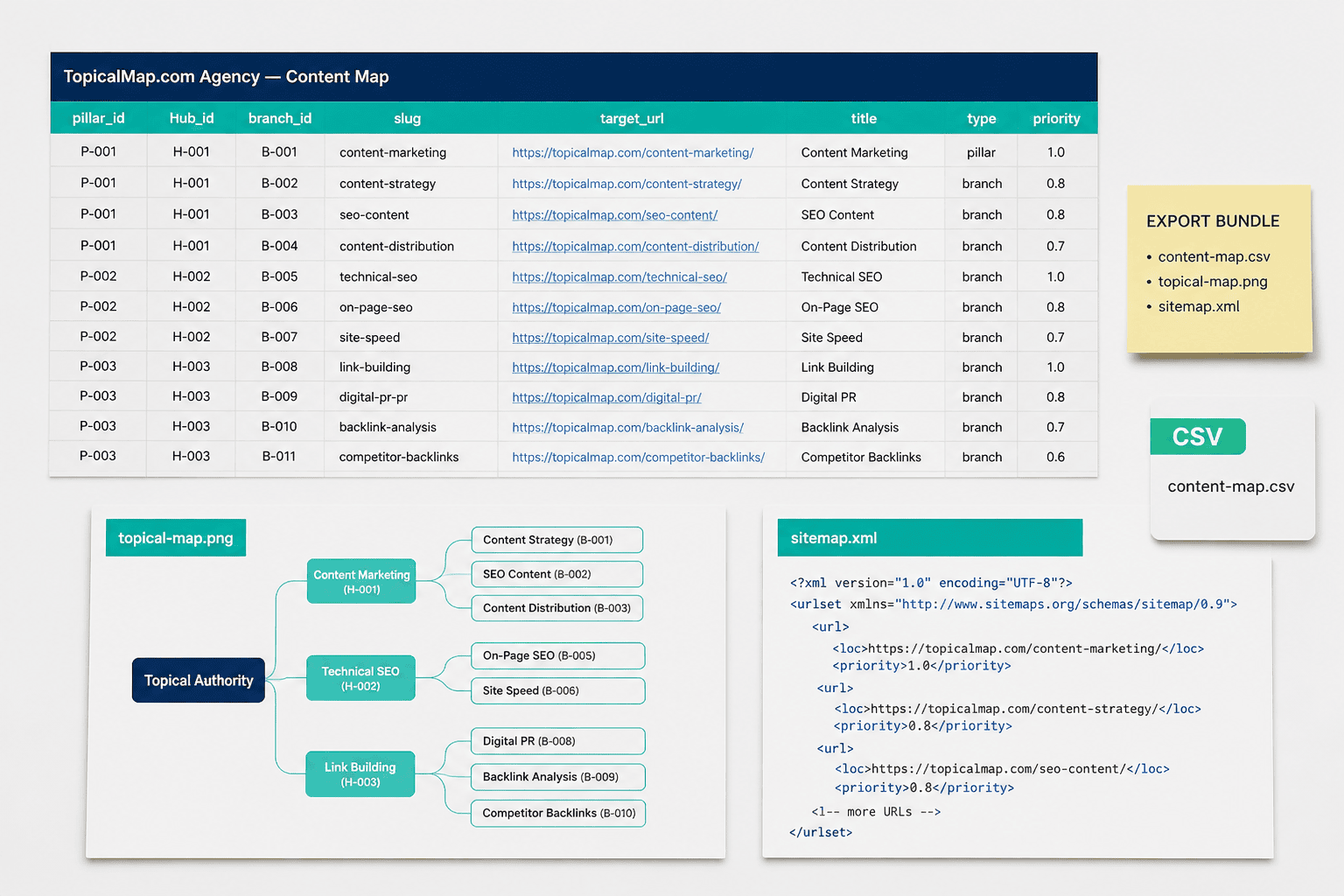
A clean export package turns content mapping into something developers, editors, and your CMS can actually use. It keeps cluster content, the keyword research process, and topic modeling out of slide decks and into a format that can be imported, validated, and shipped.
Start with a spreadsheet that matches the handoff model exactly. Your Google Sheet and CSV should use these fields:
Field | Format |
|---|---|
pillar_id, hub_id, branch_id | integers |
pillar_title, hub_title, branch_title | short labels |
primary_keyword | one target phrase |
keyword_variants | pipe-delimited list |
search_intent | required for automation |
content_type | required for automation |
target_url, canonical_url | lowercase slug URLs |
publish_date, last_updated | ISO date in yyyy-mm-dd |
author, doc_link, status, priority_score | operational fields |
Treat search_intent, content_type, and doc_link as required fields only if your own mapping workflow depends on them. Pipe-delimited variants keep long-tail keywords machine-readable without bloating the sheet.
A simple QA pass catches most mistakes before they hit staging:
- Verify unique hierarchical IDs from pillar to hub to branch.
- Confirm every required field is populated.
- Check target URL naming rules before export.
- Export UTF-8 CSV and test-import it into a staging CMS.
- Generate a sitemap CSV and run an XML linter on the output.
A few formulas and commands make the process faster. In Google Sheets, =COUNTBLANK(A2:P2) flags empty rows, =COUNTIF($A:$A,A2)>1 spots duplicate IDs, and =LOWER(SUBSTITUTE(A2," ","-")) helps standardize slugs. On the command line, csvlint content-map.csv catches formatting issues, and python make_sitemap.py content-map.csv > sitemap.xml is enough for many teams that want a plain CSV to XML step.
URL rules should stay strict. Use lowercase, hyphen-separated slugs. Keep paths to three to five words. Strip stopwords when the meaning stays clear. For nested structures, place the hub inside the pillar folder and the branch beneath it, like /pillar-slug/hub-slug/branch-slug. Add a version token only in staging, not production.
The pattern is easier to enforce with examples:
- SAAS:
/platform-overview/onboarding-workflows/email-onboarding-guide - SAAS:
/analytics-suite/reporting-dashboards/revenue-attribution - SAAS:
/customer-success/renewal-planning/churn-risk-signals - Ecommerce:
/running-shoes/trail-collection/waterproof-trail-shoes
Descriptive anchor text matters because internal links should read like editorial guidance, not generic labels. TOFU MOFU BOFU mapping also helps you place each branch in awareness, consideration, or decision content. That choice affects content strategy, CMS template selection, QA rules, and the right balance of artificial intelligence (AI) support with human review.
Your sitemap output should stay simple and valid. Use a minimal scaffold with urlset, url, loc, lastmod, changefreq, and priority. Map lastmod from last_updated, tie changefreq to status, gzip large files, and split very large sitemap files before they exceed the protocol limit for a single sitemap file (source). A small Apps Script or CSV to XML script is enough if your team prefers Google Workspace over a build pipeline.
The export package should also include machine-readable extras that save time later. Add a JSON-LD overview that summarizes pillar and hub counts plus ID to slug mapping. Include an anchors.csv file with source_id, target_id, and anchor_text so internal-link automation has a clean seed set. A redirect and canonical rule CSV rounds out the handoff, especially when URLs shift or overlaps need consolidation.
Pack the handoff as a live Sheet and CSV, sitemap XML and gzips, mind map PNG or SVG plus OPML, JSON-LD mapping, redirect rules, and import notes for WordPress or bulk CMS imports. Finish with a staging import and smoke QA pass that checks URL resolution, canonicals, sitemap output, and template selection before launch. AI-assisted drafts are reviewed and edited by a senior strategist before delivery.
Which Prefilled CSV Or Google Sheet Content Map Do You Provide?
TopicalMap.com Agency supplies three working files so your team can move from research to publishing without rebuilding the model inside the CMS. The prefilled Google Sheet topical map follows a Main Topic 1 to Subtopic 4 hierarchy. The CSV-ready import sheet is built for handoff. The sitemap-extraction template uses IMPORTXML for faster URL ingestion, and you need to add the leading = in the cell before it will run.
The core columns support both writers and engineers:
Column | How it is used |
|---|---|
URL | Final or provisional page path for CMS import and tracking |
Title | Draft H1 and meta title for briefs and CMS title fields |
Intent | TOFU, MOFU, BOFU plus primary search intent |
Cluster | Pillar, hub, or branch label for taxonomy and breadcrumb rules |
Status | Research, briefed, in draft, ready, published, archived |
publish_date | CMS scheduling field |
author | Editorial routing field |
A boolean Subtopic4=true flag surfaces the individual pages that need to be created. Filtering Status=ready gives you a clean CSV export for CMS import. Writers can draft against Title and Intent, while engineers can map publish_date and author into scheduling fields.
The sheet also makes the pillar to hub to branch model explicit. Columns for pillar, hub, branch, and internal_link_target keep internal-link rules visible. An audit tab helps you bucket existing pages into three to five hubs per pillar and mark gaps for new branch pages. That content mapping supports scalable additions over time, keeps crawlable sitemap exports intact, and gives your content audit a clearer path from existing pages to new coverage.
Common CMS workflows stay simple:
- WordPress:
slug, post_title, post_status, post_date - Shopify:
handle, title, body_html, published - Headless CMS:
path, title, content_kind, canonical
When a CMS requires unique slugs before publish, include provisional URLs so the import stays stable.
What Does A Ready To Use Sitemap XML Template Look Like?
A clean sitemap XML template should stay simple, ordered, and easy to automate. The best version matches how your team publishes pages, not how a hand-edited file looked weeks ago.
<?xml version="1.0" encoding="UTF-8"?>
<urlset xmlns="http://www.sitemaps.org/schemas/sitemap/0.9">
  <!-- Set pillar, hub, and branch length targets based on search intent, competition, and page purpose. Make sure each branch links back to its pillar with clear anchor text, and keep internal links natural rather than forcing a fixed ratio ([source](https://www.semrush.com/blog/internal-links/), [source](https://www.sitemaps.org/protocol.html)). -->
  <url>
    <loc>https://domain.com/pillar/</loc>
    <lastmod>2026-06-01</lastmod>
    <changefreq>monthly</changefreq>
    <priority>1.0</priority>
  </url>
  <url>
    <loc>https://domain.com/pillar/hub/</loc>
    <lastmod>2026-06-01T14:30:00Z</lastmod>
    <changefreq>weekly</changefreq>
    <priority>0.8</priority>
  <url>
    <loc>https://domain.com/pillar/hub/branch-article/</loc>
    <lastmod>2026-06-01T14:45:00Z</lastmod>
    <changefreq>daily</changefreq>
    <priority>0.5</priority>
</urlset>
Use <lastmod> as an ISO 8601 date or a full datetime when CI/CD automation writes build timestamps. Set changefreq to weekly for hubs, monthly for stable pillars, and daily or weekly for branches that publish often. If the cadence is unclear, omit changefreq and rely on lastmod.
Keep these notes in the template comments and CMS export:
<!-- ensure each branch links to its pillar using topic-phrase anchor text; ~1 internal link per 300 words to pillar -->- Canonical tags belong in CMS exports too, because they help prevent cannibalization.
Drop this file as sitemap.xml in a static build or map the fields in your CMS export, then validate it in Google Search Console and gzip large files.
How Should Example URL Rules And Naming Conventions Be Structured?
A clean URL system keeps site architecture easy to scan for people and crawlers. It also keeps internal linking from turning into a maze of near-duplicate paths.
Use one pattern for each layer:
- Pillar pages: keep them at the top level, such as
/pillar/ - Hub pages: place them in a subfolder, such as
/pillar/hub/ - Branch pages: use deeper subfolders or posts, such as
/pillar/hub/branch/
That layout can help keep click depth shallow and make the site easier to browse and crawl (source, source). It supports user experience and makes the content hub easier to manage.
Slug rules should stay strict:
- Use lowercase words
- Separate words with hyphens
- Keep slugs to 3 to 6 words
- Remove stop-words only when readability still holds, like
/smart-thermostats/ - Use
/page/2/for pagination instead of query parameters - Use a rel=canonical header for duplicate URLs
Query parameters belong in a narrow lane. Reserve them for session data, tracking, and optional filters like ?sort=price. Avoid using them to represent hierarchy. If filters create many combinations, set one canonical target or exclude the variants with robots rules or x-robots-tag.
Anchor text should match cluster intent, not chase repetition. A phrase like "smart thermostat installation guide" works well when it points to the right branch page. Vary anchors to avoid over-optimization, and keep the internal linking pattern close to one link per 300 words.
Use case | Best choice | Why |
|---|---|---|
Category page | Subfolder | Durable hierarchy and SEO value |
Faceted filter | Query param with canonical | Flexible without replacing structure |
Topic label cross-reference | Tag | Light discovery only, with no hierarchy signal |
Keep tags lean. Too many tags blur topical clarity and add noise without helping SEO.
How Do You Export Mind Map And Visual Cluster Diagrams?
Export each mind map in the format that matches the job. PNG works best for stakeholder reviews and slides. SVG fits designer handoffs because it stays crisp at any size and keeps text editable. OPML and Freemind, or MM, are the machine-readable versions for mind-map apps and CMS import pipelines.
Use a tight export sequence so the files stay clean:
- Confirm final labels and keep SEO terms in titles and subheadings.
- Flatten visible layers so nothing disappears in review.
- Set the PNG canvas to 1920×1080 or retina 2× for presentation use.
- Export SVG with editable text for wireframes and layout work.
- Export OPML and Freemind with node IDs, parent-child relationships, and URLs.
A simple naming convention keeps handoffs sortable:
project_pillar-hub_branch-Version_date.formatcardio_hub-exercise-bikes_v2_2026-04-01.svg
That structure helps preserve site architecture, supports user experience, and keeps content repurposing organized as the cluster grows.
Each export should ship with a small deliverable bundle:
- Annotated PNG preview
- Editable SVG source
- OPML and Freemind files with node metadata
- CSV or Google Sheet content map synced to nodes
- README with export date, author, and change notes
Keep parent and child IDs stable so new leaves can be added without breaking the trunk, main branches, or subtopics.
How Do You Import Content Maps Into Common CMS Platforms?
Start with a prefilled CSV or Google Sheet from TopicalMap.com Agency so your import schema matches the CMS before anything touches production. Use columns for title, slug, meta_description, body_html, publish_date in ISO 8601, author, tags separated by |, primary_category, featured_image_url, canonical_url, internal_links as pipe-separated slugs, and word_count. That helps you sort pillar content, hub content, and branch content before import, with rough targets of 3,000+ words for pillars, about 1,000 words for hubs, and around 800 words for branches.
Platform | Core field match | Practical note |
|---|---|---|
WordPress |
| Map |
HubSpot |
| Add |
Contentful | CSV to JSON fields like | Preload assets and taxonomy, then keep internal links as reference IDs |
WordPress usually works best with WP All Import or WXR. Use a public image URL, set post_status to publish or draft, strip trailing slashes from slugs, and resolve duplicates with incremental suffixes. HubSpot enforces unique slugs, so a primary_category/slug pattern keeps URL structure tidy. Contentful needs a CSV-to-JSON step through CLI or API, plus rate-limit awareness and pre-created assets.
A safe import checklist looks like this:
- Back up current content
- Validate UTF-8 and CSV headers
- Test 10 to 20 rows in staging
- Use absolute image URLs
- Normalize top-level paths like
/pillar/ - Rebuild internal links after import with a script
That final pass matters for E-E-A-T, because clean references and consistent URL rules make the library easier to trust, crawl, and maintain.
What Sample Files And Downloadables Should Be Included?
The strongest handoff packs give writers and developers the same source of truth. A prefilled content map does that first, because it keeps the URL, title, meta description, intent, content type, pillar, hub, or branch tag, canonical target, publish or update dates, and phrase-doc link in one place while staying ready for handoff. TopicalMap.com Agency also uses an importXML-ready sitemap extraction method, so a sitemap URL plus IMPORTXML can auto-fill routes in the sheet without manual copying.
The core files belong together:
- Prefilled content map: a Google Sheet plus CSV export for bulk route imports, writer handoffs, and update tracking
- Sitemap template: a ready-to-edit sitemap XML template with proper
<urlset>structure andpriorityandlastmodplaceholders - CMS import CSV: fields such as
path,canonical,redirect_from, andstatusfor migration work - Mind map exports: XMind, PNG, or PDF files that show pillar to hub to branch relationships
- URL rules doc: a URL rules and naming conventions guide with regex patterns and redirect logic
- Content map CSV: a prefilled content map export for route staging and developer imports
That package speeds migration because devs can stage imports, run crawl simulations, and seed redirects in one pass. It also helps you catch orphaned URLs before launch. The same structure supports content repurposing without breaking the broader content ecosystem.
A simple rollout table keeps the handoff tight:
File | Dev task | Why it matters |
|---|---|---|
Content spreadsheet | Writer brief and intent QA | Reduces cannibalization |
Sitemap CSV | Bulk import and route staging | Speeds CMS setup |
URL rules doc | Rewrite rules and CDN edge redirects | Prevents rewrite drift |
The URL rules doc should include redirect priority, canonical rules for hubs versus branches, and a sample redirect CSV with old_path,new_path,redirect_type. A rule like /product-category/ to /pillar/product-category/ with a 301 cuts repeated clarification. The QA checklist should cover jump links, mobile behavior, schema, and CTAs so the first launch pass is precise.
A 1-week rollout fits a smaller map and a familiar CMS. A 30-day rollout fits larger migrations, deeper QA, and more complex internal linking.
How Do You Plan And Execute A Migration And Internal Linking Playbook?
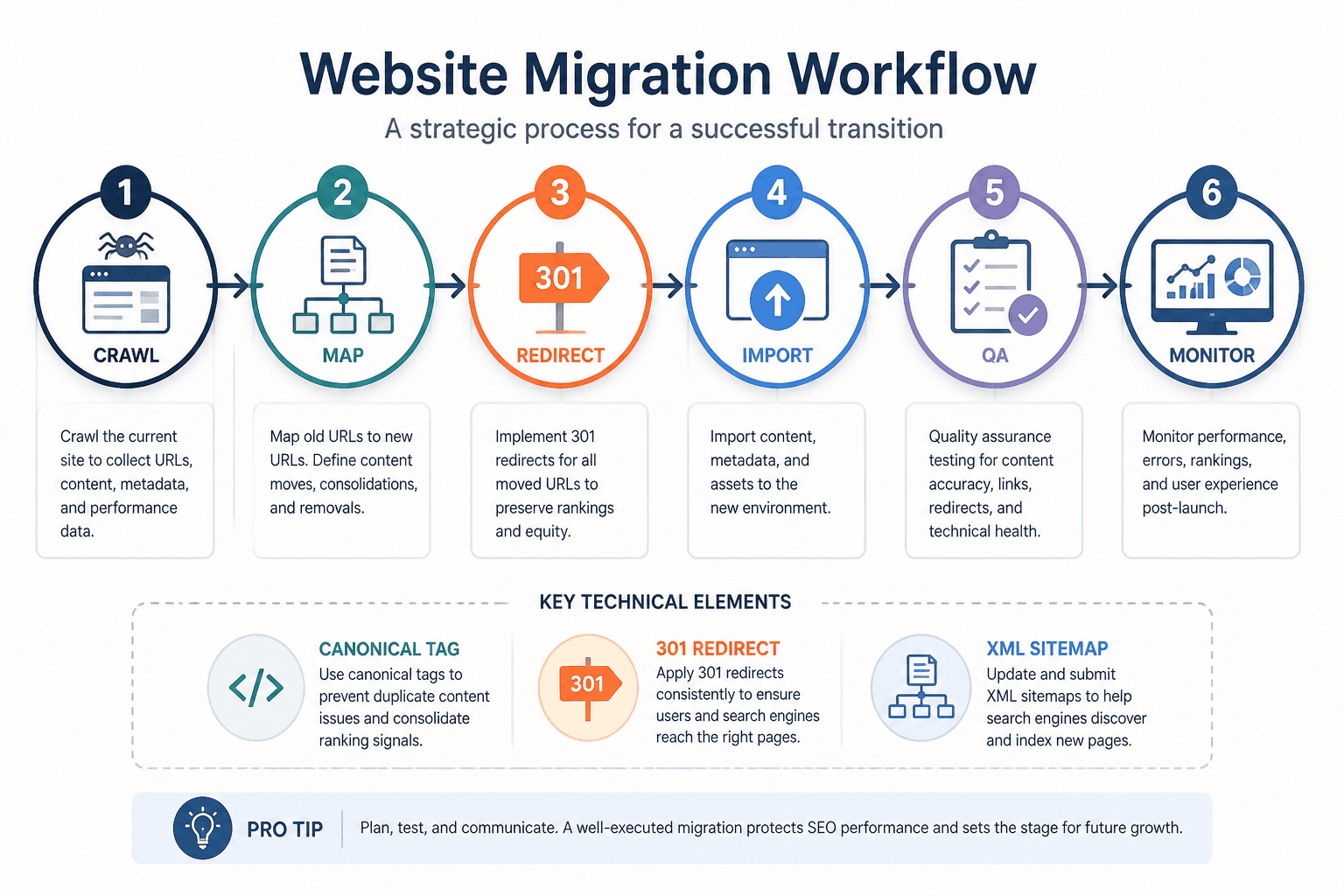
A clean migration playbook starts with a content audit and ends with rollout controls that you can measure. The safest path is to map every URL before anything moves, then tie each page back to the topical map so the handoff stays clean.
Start by exporting the sitemap and crawling the site so you can review URL, status, canonical, rel=prev/next, meta robots, and internal links in one place. Then map each URL to intent, pillar, hub, or branch assignment, plus publish or update date and author. That gives you one source of truth and strips out the guesswork before the first redirect is planned.
The next move is to sort existing posts into topic clusters that fit a hub-and-spoke model, and building topic clusters this way keeps related posts grouped under the right hub. In practice, that usually means:
- Pillar pages: broad themes that can support a set of related posts
- Hub pages: subtopic groups that usually form 3 to 5 logical buckets per pillar
- Branch pages: narrower articles that answer specific user intent and feed the hub
Pillar pages can support a set of related posts when the topic has enough depth (source). Pages that already meet pillar-support thresholds should stay close to the center of the architecture.
Redirects and canonicals need to follow the hierarchy, not fight it. Retired or merged branches should use 301 redirects to the most relevant hub or pillar. Consolidated survivors should carry canonicals with a short rationale tied to user intent, traffic, and backlinks. Near-duplicate rules should favor canonical consolidation when sub-intents overlap, while separate pages should stay live when the intent is different enough to deserve its own ranking path.
That decision is easier when you use a simple table:
Situation | Preferred action | Why it fits |
|---|---|---|
Retired branch with no unique value | 301 redirect to hub or pillar | Preserves equity and reduces dead ends |
Consolidated page with remaining value | Canonical to the chosen survivor | Keeps signals on the strongest URL |
Similar pages with different sub-intents | Keep separate, then link tightly | Avoids forced merging that hurts relevance |
High-backlink legacy page | Test the redirect batch first | Lowers risk if traffic or links are fragile |
Internal linking should mirror the same logic. Pillars should link to hubs and branches. Hubs should link back to the pillar and out to branches. Branches should point up to both hub and pillar. Descriptive, keyword-rich anchor text works best when it still reads naturally, and most large sites should keep internal links per page under about 100 so crawl and UX stay sane. Cross-cluster links can help, but only when the connection is genuinely relevant.
A phased rollout lowers the odds of a messy launch. Use this sequence:
- Pre-launch crawl and QA: confirm redirects, canonicals, templates, and XML sitemap changes.
- Soft launch subset: publish one silo and watch behavior before expanding.
- Full launch: release the rest of the silo once the first batch is stable.
- Monitoring: track organic impressions, clicks, rankings for pillar and hub keywords, crawl errors, and redirect rates.
Guardrails matter just as much as the launch order. Migration teams should define their own rollback trigger from baseline traffic and conversion data, then monitor top pages closely after launch.
A/B tests and incremental experiments make the playbook better over time. Test linking patterns, page templates, and canonical versus redirect decisions on matched cohorts. Snapshot redirect configs, keep a staging indexable preview, and publish staged sitemaps before each silo goes live. Leave each silo under observation for 30 to 90 days, then log experiment IDs, dates, and outcomes in the topical map so the next team can reuse the decision history instead of re-learning it.
How Should You Measure Cluster Performance And Run Experiments?
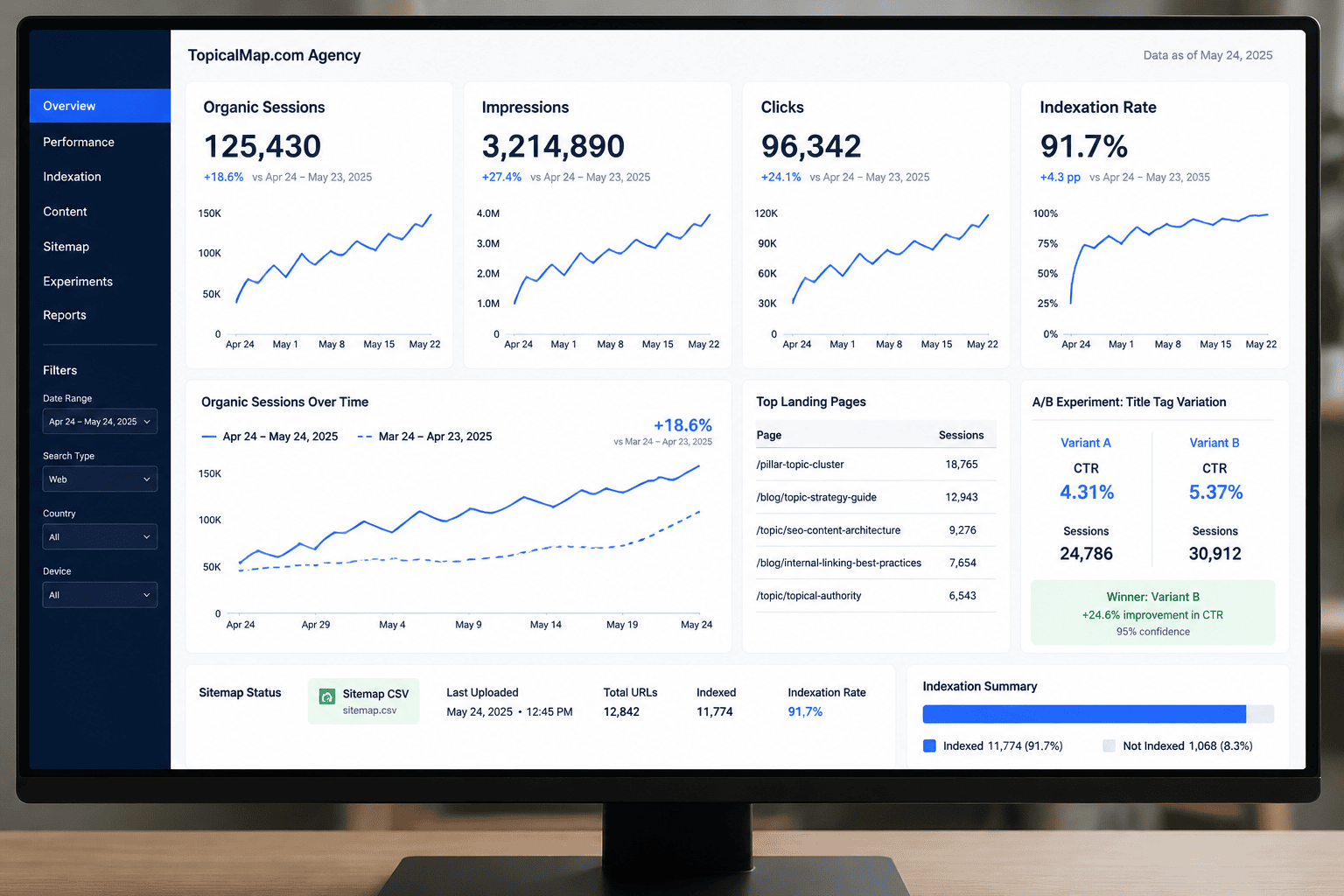
Measurement starts with a tight KPI set that ties content work to revenue and topical authority. Organic sessions and clicks show demand capture. Organic conversions and assisted conversions show whether the cluster supports sales or pipeline. Target keyword visibility, crawl coverage, indexation rate, and internal-link equity flow show whether the architecture is healthy enough to support E-E-A-T and, in some cases, featured snippets. Pairing those signals with ongoing search intent analysis confirms each page still answers the query it targets.
Topic modeling helps define cluster boundaries, but the dashboard should stay simple enough for weekly review. Keep the signals separate so a noisy metric does not blur the pattern.
KPI | What it tells you | Why it matters |
|---|---|---|
Organic sessions and clicks | Demand and reach | Confirms that the cluster attracts search traffic |
Organic conversions and assisted conversions | Revenue impact | Connects the cluster to business outcomes |
Top-3 and top-10 visibility | Ranking strength | Shows whether priority pages are gaining traction |
Crawl coverage and indexation rate | Technical access | Confirms that search engines can find and index the cluster |
Internal-link equity flow | Authority distribution | Shows whether the pillar receives enough support from branch pages |
Benchmarks should be evidence-based, not heroic. Set performance targets from your current baseline before you test cluster changes (source, source). Vertical mix matters. SAAS, retail, and informational clusters rarely move on the same timeline.
Your tracking setup should have three layers:
- In Google Analytics 4, tag pages into cluster groups with content grouping or custom dimensions.
- Add URL-based filters and sitemap CSV tags so reporting stays clean.
- Export weekly rank data for seed keywords with SERP position, impressions, and CTR.
Crawl data should also track discovered-to-indexed movement, HTTP status changes, and canonical conflicts over time.
The internal-link view often reveals the real story. Measure unique branch-to-pillar links, average path depth to the pillar, and crawl requests per cluster each week. When pages move from discovered to indexed after interlink updates, that gives you a strong signal that the cluster is easier for search engines to interpret. It also helps validate claims tied to A10, A11, and A22.
Experiments should match traffic volume and risk. Use a controlled split, keep the test long enough to collect meaningful data, and measure sessions, conversions, impressions, and keyword movement against a stable control group (source, source). QA redirects, canonicals, and URL consistency before launch. Pause if sessions or visibility drop by more than 20% within two weeks.
A simple success rule keeps teams honest. After a hub-linking overhaul, expect roughly a 15% lift in impressions, about 12% more sessions, and three to five keywords moving into the top 10 within three months. Content-depth targets should also match the word-count ranges set for each branch so the cluster has enough substance to compete.
Pillar Hub Branch FAQs
These FAQs cover the parts of pillar-hub-branch planning that teams usually trip over, from structure and internal linking to rollout decisions and measurement. They’re meant to help you pressure-test the model before you build it.
1. Who owns pillar, hub, and branch content internally?
A simple RACI split keeps ownership clear and handoffs clean. For pillar pages, the head of content is accountable, the SEO strategist is responsible, and product or marketing stays consulted so the core interest and roadmap stay aligned. For hubs, the content lead is accountable and creators are responsible, with SEO consulted on intent and internal linking at brief approval. For branches, the content editor is accountable, writers are responsible, SEO advises on keywords, and engineering is informed at the final URL and template stage while canonical and internal-link rules are reviewed.
2. How often should cluster maps be reviewed and updated?
A quarterly audit is the best default, with a 15-minute monthly maintenance pass for quick checks and fixes. Siteimprove’s suggested cadence for pillar pages and QA fits that rhythm, so the map stays useful without turning into busywork. Each cycle, refresh target keywords, draft and published status in your topical map, internal anchor text, canonical rules, and pillar-to-hub linking. Update sooner if a cluster shifts by more than 20% in traffic, the SERP intent changes, or a new product or feature reshapes the user journey, and keep the spreadsheet synced with status colors, GA4 content group performance, and change notes.
3. How do you handle canonical URLs across branches?
Use a canonical to the hub or pillar when a branch page is mostly a duplicate, such as a variant landing page or filtered product view, because that helps prevent keyword cannibalization and keeps topical boundaries clean for Search Engine Optimization (SEO). Keep unique URLs when a parameter changes the main content, such as sorting or session IDs, and only point rel="canonical" to the clean URL when the core page stays the same. If branches are only lightly different, consolidate them into one stronger hub page, 301-redirect the weaker URLs, and then update canonical tags, internal links, and the XML sitemap after the change.
4. Can one page belong to multiple pillars safely?
Yes, a page can sit at the intersection of multiple pillars, but it should still have one primary pillar so your SEO signals stay clean. In a pillar-hub-branch model, use one canonical URL, strong hub-level contextual links from the other pillars, and tags or relational metadata so the page can surface in more than one place without duplication. Tagging is usually safer, though it can blur focus if you overdo it, and duplicate pages only make sense when user intent is genuinely different, such as product detail versus how-to, because near-duplicates increase cannibalization and make measurement harder.
5. How do you localize pillar-hub-branch structures internationally?
International localization works best when you choose a small, deliberate set of markets first, including language variants such as simplified versus traditional Chinese, and commit to roughly 3 to 6 clusters per market so the work stays focused. Keep localized URLs in subfolders, place the pillar at the locale root, and nest hubs and branches beneath it so the hierarchy stays crawlable and easy for SEO. Translate the pillar and hub pages first, then adapt branch pages for local intent while keeping core signals like headings, schema, internal links, title, H1, and meta aligned across versions. Finish by adding hreflang, locale-specific canonicals, and x-default, then run a parity check to confirm the primary internal link sits near the top of the page and that the localized cluster still protects topical authority without crowding main content with too many outgoing links.